
JoomBook Booking Wizard DEMO
This booking form needs JavaScript. Please enable JavaScript in your browser and reload the page. If the message stays, the site operator can check whether a script blocker, a consent tool or a caching extension is stopping the JoomBook scripts from loading.
Location
No locations available at the moment.
Choose a category
Service
No services available in this category.
Choose staff
2nd Staff Member
Date
Choose a time
No available slots on this day.
Waitlist
Your preferred time is not available? You can join the waitlist for the following time slots. Simply click on your desired time and fill in the form.
Enter your contact details and we will notify you as soon as a spot becomes available. You will then have a limited time to confirm your appointment.
Additional details
Your details
Confirm booking
Booking Received!
You will receive a confirmation email shortly. We look forward to seeing you!
Almost there - please confirm your booking
Booking received – we are reviewing your note
We have received your booking. Since you left a note, we will review it briefly and confirm your appointment by email afterwards.
Booking received - we will confirm your appointment shortly
We have received your booking and will confirm your appointment by email shortly.
 Scheduling powered by JoomBook
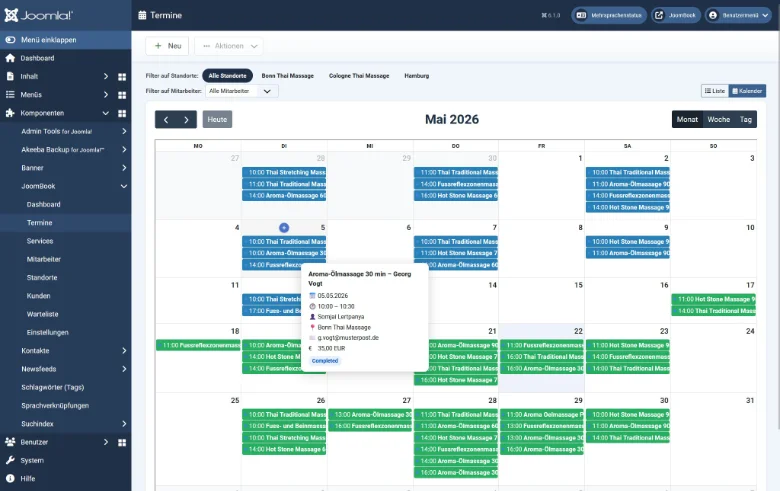
The Admin-Backend
✓ Calendar view of all appointments
✓ Manage staff schedules
✓ Create services & categories
✓ View customer data
✓ Customize email templates